Grunge Patterns: Seamless, High-Resolution Vector Resources for Real-World Design Work
Whether you're designing album covers, crafting textured web backgrounds, or producing limited-run apparel prints, Grunge Patterns offer a fast, professional way to add authentic, tactile depth to your visuals—without starting from scratch. These aren’t generic filters or low-res overlays. They’re meticulously crafted, seamlessly repeating vector patterns, built to scale flawlessly across any print or digital surface.
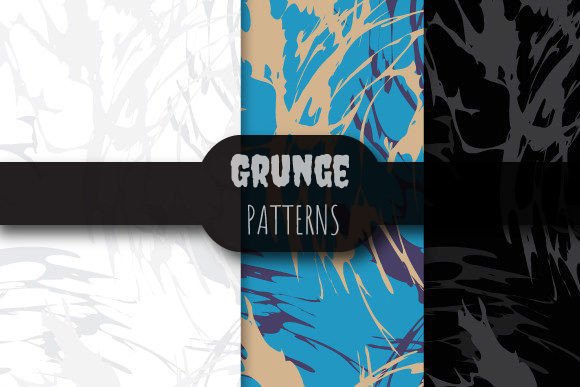
Each pattern in this collection is delivered at industry-standard specifications: 12 x 12 inches (3600 x 3600 pixels), rendered at 300 dpi for crisp physical output—and saved in EPS 10 format for full vector editability in Adobe Illustrator and compatible software. The included ZIP file contains three EPS files and three matching high-fidelity JPEG previews, giving you both editable precision and quick visual reference.
What Exactly Are Grunge Patterns—and Why Do They Matter?
Grunge Patterns refer to stylized, intentionally imperfect textures rooted in the raw aesthetic of 1990s alternative culture—but updated for modern design workflows. Think distressed paper, cracked concrete, weathered metal, ink bleeds, and organic grain—designed not as static images, but as infinitely tileable vector assets. Unlike raster-based textures that pixelate when enlarged, these are true vector patterns: mathematically defined, resolution-independent, and fully scalable without quality loss.
This distinction matters because real-world design projects rarely fit a single size or medium. A logo background might need to stretch across a business card *and* a trade show banner. A textile designer may need the same texture to repeat cleanly across a 48-inch fabric width. With Grunge Patterns, you get consistency, flexibility, and fidelity—right out of the ZIP file.
The Challenges Designers Actually Face
Many professionals hit familiar roadblocks when adding texture:
- Time pressure: Hand-drawing or photo-sourcing grunge elements eats hours—and often yields inconsistent repeats.
- Scale limitations: JPEG or PNG textures blur or tile visibly when scaled beyond their native dimensions.
- Editing friction: Raster layers can’t be recolored non-destructively, adjusted in stroke weight, or repositioned with vector precision.
- Print readiness: Low-resolution or RGB-only assets risk rejection by commercial printers—or costly last-minute fixes.
These aren’t theoretical concerns. They delay client approvals, inflate revision cycles, and limit creative experimentation. That’s where purpose-built Grunge Patterns shift the balance: they turn texture integration from a bottleneck into a streamlined step.
How Grunge Patterns Solve Real Workflow Problems
Because each pattern is seamlessly repeating and saved in EPS 10, you can drop it directly into Illustrator, resize it to fill any artboard, and apply global adjustments—like changing the base color via Live Paint or adjusting opacity with blending modes—all while preserving sharp edges and clean tiling.
For example, a branding designer working on a craft brewery identity might use one of the included patterns as a subtle underlay beneath a label illustration. By setting it to Multiply mode at 15% opacity, it adds warmth and authenticity without competing for attention. Later, when the client requests a large-format window decal, the same EPS scales effortlessly to 6 feet wide—no resampling, no artifacts, no redraw.
Likewise, a motion graphics artist building a gritty title sequence can import the JPEG preview into After Effects for quick compositing, then swap in the EPS version for final render export—ensuring text and vector elements remain razor-sharp.
Practical Applications Across Disciplines
Grunge Patterns thrive where texture supports meaning—not distracts from it. Here’s how different users apply them effectively:
- Graphic designers layer them behind typography for editorial spreads or posters, using clipping masks to confine texture to specific letterforms.
- Web and UI designers extract small segments to create CSS background repeats—or convert them to SVG for lightweight, responsive texture overlays.
- Apparel and surface designers align repeats precisely to fabric grain lines or product seams, leveraging the 12×12 inch canvas to match common textile repeat standards.
- 3D artists and illustrators use the JPEG previews as PBR roughness or ambient occlusion maps—enhancing realism in renders without heavy custom texture painting.
Crucially, none of these uses require advanced technical skill. If you know how to place an image or apply a swatch, you can begin using Grunge Patterns immediately—and refine technique over time.
Key Considerations Before You Implement
While Grunge Patterns simplify texture work, thoughtful implementation ensures best results:
- Color mode matters: EPS files retain CMYK or RGB profiles based on your document settings—verify color space before sending to print.
- File size awareness: Though vector-based, complex grunge paths may increase Illustrator file weight. For large layouts, consider embedding only the visible portion or using rasterized previews during editing.
- Intentional restraint: Grunge conveys mood, not clutter. Start with low opacity (5–20%) and build up only if needed—let content breathe.
- Consistency across assets: Use the same pattern family across a brand system (e.g., one for print, a lighter variant for web) to reinforce cohesion without monotony.
Also note: the inclusion of both EPS and JPEG files isn’t redundancy—it’s workflow insurance. Use EPS when precision, scalability, or editing is required; use JPEG for fast mockups, client presentations, or platforms that don’t support vector imports.
Why This Collection Stands Apart
Not all grunge assets are created equal. Many free or low-cost options rely on scanned photos or raster brushes—limiting adaptability and risking copyright ambiguity. These Grunge Patterns were designed from the ground up as production-ready vectors: original, commercially safe, and built to integrate cleanly into professional pipelines.
The fixed 12×12 inch / 3600×3600 px / 300 dpi specification means no guesswork about print readiness. The EPS 10 format ensures compatibility with Illustrator CS6 through CC 2024—and remains editable in Affinity Designer and CorelDRAW with minor conversion. And because the ZIP includes three distinct patterns (not variations of one), you gain immediate variety—whether you need coarse grit, fine grain, or layered distress.
In short, Grunge Patterns deliver what working designers truly need: speed without sacrifice, texture with control, and versatility without compromise.