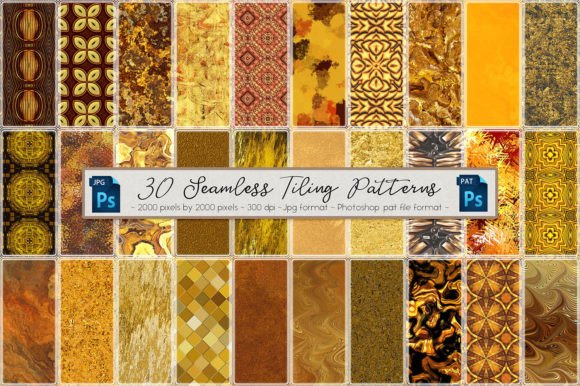
Gold Seamless Tiling Patterns Set 1
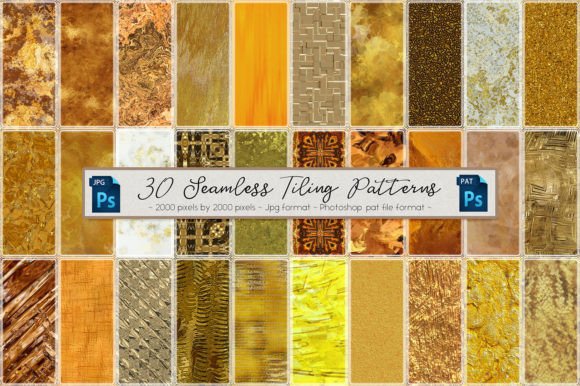
Gold Seamless Tiling Patterns Set 1 is a curated collection of 30 high-resolution, repeatable background textures designed for professional digital design work. Each pattern is delivered in two formats: a standalone JPG file (2000 × 2000 pixels, 300 dpi) and a ready-to-load Photoshop .pat file. This dual-format approach ensures flexibility across different stages of a design project — whether you're sketching early concepts, refining layouts in Photoshop, preparing assets for web or print output, or archiving reusable resources for future campaigns.
Unlike generic gold textures found in free asset libraries, these patterns are engineered for seamless tiling without visible seams, banding, or color shifts — critical when scaling across large banners, packaging mockups, presentation decks, or UI backgrounds. The 2000-pixel resolution strikes a practical balance: large enough to retain crisp detail at print sizes up to A3 or full-screen web displays, yet lightweight enough to keep Photoshop performance stable even with multiple layers active.
How It Fits Into Real Design Workflows
Gold Seamless Tiling Patterns Set 1 isn’t a one-off decorative element — it’s a workflow accelerator. Its value emerges most clearly when mapped against common production phases:
- Before a project begins: Use the .pat file to pre-load swatches into Photoshop’s pattern library. This eliminates time spent hunting for assets mid-design or manually adjusting tile alignment. For teams, standardizing on this set means consistent gold texture application across brand guidelines, reducing revision rounds.
- During execution: Apply patterns directly via the Fill dialog (Edit > Fill > Custom Pattern) or layer styles. Because each pattern is precisely 2000 × 2000 pixels and saved at 300 dpi, scaling remains predictable — no pixelation when enlarging for billboard mockups or shrinking for social media thumbnails.
- After delivery: Keep the JPG versions archived alongside project files. They serve as editable fallbacks if a client requests a version outside Photoshop — for example, importing into Figma (via image fill), Illustrator (as pattern swatches after manual definition), or Canva (uploaded as custom background images).
Integration With Other Tools and Assets
This set works best when treated as part of a coordinated asset system — not in isolation. For instance:
- If you use Adobe Creative Cloud Libraries, drag the JPGs into a dedicated “Gold Textures” library. That makes them instantly available in Illustrator, InDesign, and After Effects — not just Photoshop.
- When paired with gold foil stock photos or metallic gradient overlays, these patterns add depth without visual competition. Try applying a subtle Overlay blend mode at 15–30% opacity over a product photo to suggest luxury finish without obscuring detail.
- For web developers collaborating with designers, share the JPGs (not the .pat file) with clear naming conventions — e.g.,
gold-herringbone-2000x2000.jpg. These can be converted to CSS background patterns using tools like Patternify or embedded directly as responsivebackground-imagedeclarations.
Compatibility is built-in but requires light setup. The .pat file loads instantly in Photoshop CS6 and later — including Photoshop for iPad (via desktop sync). No plugins or converters needed. If you’re using Affinity Photo or GIMP, rely on the JPGs and define patterns manually using their respective pattern creation workflows. The uniform size and resolution simplify that process significantly.
Practical Implementation Tips
Here’s what experienced users consistently report improves efficiency and consistency:
- Name and organize before loading. Rename the .pat file to include the set number and date (e.g.,
Gold-Seamless-Set1-2024.pat). Store it in a dedicated “Patterns” folder inside your Photoshop presets directory — not just on the desktop. This avoids accidental duplication or version confusion across machines. - Test scale behavior early. Create a new document at your target output size (e.g., 3000 × 2000 px for a trade show banner), then apply a pattern at 100% scale. Zoom to 100% and pan across edges. Look for subtle misalignments — rare with this set, but worth verifying once per project type.
- Use smart objects for non-destructive editing. Convert pattern-filled layers to Smart Objects before applying filters or transformations. This preserves editability: double-click the layer to adjust pattern scale, rotation, or offset without reapplying.
- Match lighting direction with other elements. Gold reflects light. If your composition includes a spotlight effect or shadow layer, rotate the pattern slightly (via Edit > Transform > Rotate) to align its subtle grain or sheen with your scene’s implied light source.
Long-Term Usability and Quality Control
Because all 30 patterns are delivered at identical resolution and DPI, they behave uniformly across projects — no need to recalibrate export settings per file. That consistency reduces cognitive load during repetitive tasks like batch-processing seasonal marketing assets or updating templates for quarterly reports.
For quality control, treat the JPGs as your master reference. If you ever need to verify how a pattern renders in another application — say, exporting from Illustrator to PDF — compare the output against the original JPG at 100% zoom. Any deviation points to software-specific rendering quirks, not the asset itself.
Organization matters for longevity. Keep both formats together in one folder labeled by set name and version. Add a simple readme.txt noting usage rights, compatible software versions, and known limitations (e.g., “Not optimized for sub-72dpi mobile screens”). This pays off when revisiting a project six months later or handing off files to a contractor.
Where It Adds Value Across Roles
The utility of Gold Seamless Tiling Patterns Set 1 extends beyond graphic designers:
- Marketers use it to quickly generate on-brand email headers, LinkedIn cover images, or ad variations — maintaining gold-accented luxury cues without custom illustration.
- Educators and presenters apply subtle gold patterns to slide backgrounds, improving visual hierarchy while avoiding visual fatigue from solid colors.
- Small business owners building Shopify stores or Canva-based sales kits import the JPGs directly, creating cohesive product page banners or printable promo cards in under five minutes.
- Freelancers bundle the set with deliverables as added value — clients receive both final designs and the exact textures used, supporting future edits or extensions.
No single pattern dominates. The variety — from fine linear weaves to bold geometric repeats and organic granular textures — means you can match tone to context: minimalist grids for tech branding, soft mottled finishes for wellness content, or rich damask motifs for premium hospitality visuals.
Ultimately, Gold Seamless Tiling Patterns Set 1 functions as infrastructure — quiet, reliable, and always ready. It doesn’t replace skill or strategy. Instead, it removes friction from execution so attention stays where it belongs: on message, audience, and outcome.