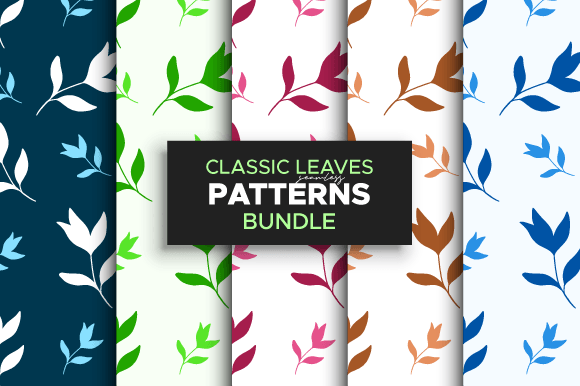
Tropical Leaves Digital Patterns Bundle
Hi there—I’m AJ. I’m a professional graphic designer with years of experience crafting logos, patterns, and visual assets for real-world applications. Over time, I’ve worked closely with print-on-demand sellers, indie packaging designers, small-batch stationery brands, and educators building classroom resources. What consistently stands out? The need for versatile, production-ready pattern assets that don’t sacrifice personality or professionalism. That’s why I created the Tropical Leaves Digital Patterns Bundle: ten cohesive, vibrant, and technically sound digital patterns designed to integrate smoothly into your workflow—not just as decoration, but as functional design tools.
Why These Patterns Fit Real Creative Workflows
This isn’t a collection of generic leaf motifs slapped onto repeat swatches. Each of the ten tropical leaf patterns was developed with intention—considering scale, rhythm, color balance, and edge alignment. They’re built to tile cleanly without visible seams, whether you’re applying them to a tote bag mockup in Canva, setting up a Shopify product background, or laying down a subtle texture behind educational posters. Because they’re rooted in actual design practice—not just trend-chasing—they hold up across contexts: from soft pastel backgrounds on baby apparel to bold, saturated repeats on eco-friendly soap packaging.
What You Get—and Why File Types Matter
The Tropical Leaves Digital Patterns Bundle includes three essential file formats—each serving a distinct purpose:
- JPEGs (800 × 800 px): Ideal for quick previews, social media mood boards, client presentations, or uploading directly to POD platforms like Printful or Redbubble that accept raster files. Their consistent size makes batch uploads predictable and efficient.
- Adobe Illustrator (.AI) file: All ten patterns are saved as editable swatches inside a single, well-organized document. You can drag, recolor, resize, or layer them without distortion—and because they’re vector-based swatches, they scale infinitely for large-format prints like wall decals or fabric yardage.
- EPS file (300 DPI): A high-resolution, universally compatible vector format. Useful if you’re collaborating with printers, packaging vendors, or designers using older versions of Illustrator—or if your workflow relies on software outside Adobe’s ecosystem.
This combination means you’re not locked into one tool or output method. A freelance educator designing printable worksheets can drop the JPEGs straight into Google Slides. A boutique skincare brand owner prepping labels for a local printer can send the EPS file confidently. And a logo designer adding texture to a brand refresh can tweak colors and spacing in the AI file—no reverse-engineering required.
Who Benefits Most—and How
The Tropical Leaves Digital Patterns Bundle serves best when it solves a specific bottleneck. For example:
- Print-on-demand sellers often spend hours adjusting free patterns to avoid copyright flags or pixelation at scale. These patterns come pre-cleared for commercial use, properly sized, and optimized for tiling—so you can upload, test, and launch a new notebook or phone case design in under 20 minutes.
- Small business owners launching sustainable packaging need textures that feel organic and warm without looking clichéd. These leaves avoid overused monstera tropes; instead, they blend stylized fronds, asymmetrical vines, and subtle negative space—giving artisanal tea boxes or reusable produce bags quiet sophistication.
- Educators and content creators building themed learning kits (think “rainforest habitats” or “botany units”) benefit from clean, scalable graphics that print crisply on letter-sized paper—even on basic inkjet printers. No blurry edges, no mismatched colors.
A Designer’s Perspective on Practical Use
Having spent years troubleshooting pattern-related issues—from misaligned repeats on fabric rolls to CMYK shifts in label printing—I built this bundle with those pain points in mind. The color palettes are intentionally limited (4–6 harmonious hues per pattern), making recoloring fast and predictable in Illustrator. No muddy gradients or overly complex overlays that break down at small sizes. And because all ten concepts share a unified aesthetic language—curved stems, varied leaf shapes, balanced density—you can mix and match across product lines without visual whiplash. Try pairing Pattern #3 (a tight, rhythmic vine repeat) with Pattern #7 (a looser, watercolor-inspired leaf scatter) on complementary items like matching mugs and coasters.
When to Consider Alternatives
This bundle shines for projects where authenticity, consistency, and technical reliability matter more than maximal novelty. It’s not meant for users needing photorealistic foliage, hand-drawn imperfections, or ultra-minimalist line art. If your brand identity leans heavily into Scandinavian simplicity or industrial grit, these tropical patterns may sit too far outside your visual tone. Likewise, if you require animated patterns, SVGs for web use, or Pantone-matched spot-color versions, this set doesn’t include those—but its clean vector foundation makes adapting it to those needs more feasible than starting from scratch.
How to Make the Most of the Bundle
Start by opening the AI file and exploring the Swatches panel. Try applying each pattern to a simple rectangle, then adjust hue and saturation using Illustrator’s Recolor Artwork tool—many users find fresh variations just by shifting the base green a few degrees. For packaging mockups, place the JPEGs on a separate layer in Photoshop and set blending modes to Multiply or Overlay to preview how they interact with underlying product photos. And if you’re designing for physical products, always test a small print run first: some POD providers compress JPEGs or interpret swatch scaling differently, so verifying tile continuity at actual size prevents costly reprints.
A Note on Long-Term Value
Unlike trend-dependent assets that feel dated in six months, these patterns prioritize timeless botanical structure over fleeting aesthetics. The leaves aren’t tied to a single season or platform algorithm—they’re drawn from real plant morphology, scaled and abstracted thoughtfully. That means the Tropical Leaves Digital Patterns Bundle supports iterative work: updating a brand palette next year? Swap colors in the AI file. Launching a new product category? Reuse the same pattern logic across labels, web banners, and email headers. You’re investing in flexibility—not just decoration.
If you're balancing tight deadlines, limited design resources, or the need to maintain visual cohesion across multiple touchpoints, this bundle offers grounded, usable support—not just inspiration. It’s the kind of asset I reach for when a client needs something joyful and polished, fast—and I know it’ll hold up long after the first launch.