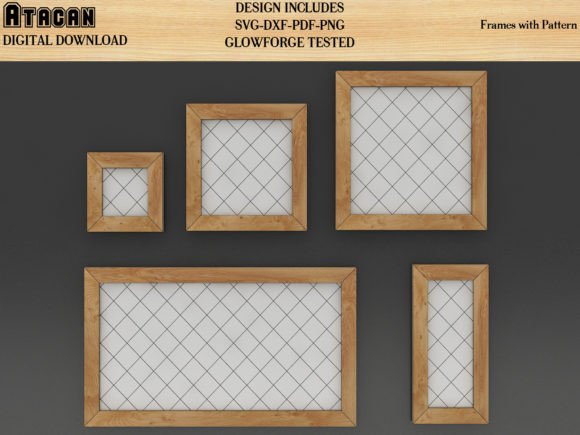
Glowforge Frame Bundle with Patterns
If you’ve ever spent hours adjusting, scaling, or redrawing frame templates—only to find they don’t align properly on your laser bed or cut unevenly—you’re not alone. The Glowforge Frame Bundle with Patterns solves that. It’s a curated collection of precision-designed vector frames built specifically for the Glowforge Pro’s 19.5" × 11.5" cutting area—but engineered with universal compatibility in mind. These aren’t just decorative borders; they’re functional, production-ready layouts optimized for accuracy, repeatability, and clean cuts across materials like wood, acrylic, leather, cardstock, and even thin metals.
What People Often Misunderstand About Compatibility
Many assume “Glowforge-compatible” means the files only work on Glowforge machines. That’s not true—and it’s one of the most common misconceptions. While these patterns were tested and fine-tuned on a Glowforge Pro (including kerf compensation, focus height alignment, and material-specific settings), the underlying vector files—DXF, SVG, PDF, AI, and CDR—are format-agnostic. They import cleanly into software used by Cricut Design Space, Silhouette Studio, Brother ScanNCut Canvas, Sizzix eClips, Gemini, and CorelDRAW. Even users running LightBurn, RDWorks, or LaserGRBL will find them ready to scale and cut without conversion headaches.
The mistake? Downloading “Glowforge-only” bundles that embed proprietary settings or rely on Glowforge’s cloud-based auto-tracing—then discovering those files won’t open or behave predictably elsewhere. This leads to wasted time re-drawing frames, inconsistent sizing, or misaligned joints in multi-piece projects like shadow boxes or layered wall art.
Why File Format Choice Matters More Than You Think
You’ll receive DXF, SVG, PDF, AI, and CDR files—and a JPG for visual reference only. That last detail is critical: JPGs are not editable or cut-ready. Yet some users open the JPG first, try to trace it in their software, and end up with jagged edges, inaccurate dimensions, or missing layers. Vector formats preserve mathematically precise curves and straight lines, which is essential when cutting interlocking frames or nesting multiple designs efficiently.
A better approach? Start with the DXF or SVG if you’re using Cricut, Silhouette, or LightBurn—it’s widely supported and retains layer structure. Choose AI or CDR if you’re editing in Adobe Illustrator or CorelDRAW and need full path control. And always verify units before importing: some machines default to inches while others use millimeters. A quick unit check prevents a 10-inch frame from becoming a 10-mm sliver.
Common Scaling Pitfalls—and How to Avoid Them
Scaling is where many beginners lose accuracy. You might resize a frame in Silhouette Studio to fit your material, only to realize later that stroke widths, corner radii, or internal spacing no longer match the original design intent. That affects structural integrity—especially for frames meant to hold glass, acrylic, or printed inserts.
Here’s what works: Use the “scale proportionally” function *and* lock aspect ratio *before* resizing. Better yet, work at 100% scale and adjust your material size instead. If your machine supports custom bed dimensions (like LightBurn or RDWorks), set your workspace to match the actual cutting area—not the default template. That way, your frame stays true to its intended proportions without manual guesswork.
Real-World Use Cases Beyond Laser Cutting
These frames aren’t limited to wood or acrylic. Because they’re clean vector outlines, they adapt well to paper craft machines like the Cricut Maker or Silhouette Cameo. Think layered greeting cards, custom photo mats, die-cut packaging prototypes, or classroom teaching tools for geometry or design principles. Educators use them to demonstrate symmetry, tessellation, or measurement concepts—no drawing skills required.
Freelancers and small business owners often overlook how much time these bundles save in client revisions. Instead of rebuilding a custom frame layout from scratch for every new logo or photo insert, you drop in the pre-aligned pattern, swap out text or graphics, and export—cutting turnaround time by 40–60% on repeatable product lines like engraved coasters, framed certificates, or retail display signage.
What to Check Before You Download—or Buy
- Layer organization: Open the SVG or DXF in a viewer (like Inkscape or online SVG editors) to confirm cut lines, score lines, and engraving areas are on separate, labeled layers—not merged into one blob.
- Units and DPI: Verify the file uses real-world units (inches/mm), not arbitrary pixels. A 72-DPI SVG may render inaccurately on laser software expecting 96 or 300 DPI.
- Material notes: Look for included guidance—even brief tips like “Use 0.125” acrylic for best fit” or “Score line width: 0.005”” help avoid trial-and-error.
- License scope: These files are for personal and commercial use, but double-check whether redistribution or resale of the *files themselves* is allowed—most creators prohibit that, though finished physical products are fine.
When Simpler Is Smarter
Some bundles overload users with dozens of ornate, highly detailed frames—beautiful, but impractical for beginners or tight deadlines. The Glowforge Frame Bundle with Patterns focuses on clarity and utility: clean lines, consistent margins, intuitive naming (e.g., “Frame_8x10_Scored_Back”), and minimal anchor points. Fewer nodes mean faster processing, smoother motion paths, and fewer chances for software to misinterpret curves during import.
If you’re just starting out, begin with the basic rectangular or square frames—not the floral scrollwork or Gothic arch variants. Master alignment, nesting, and kerf adjustment first. Then layer in complexity. Trying to cut intricate filigree before understanding how your machine handles small-radius corners is like learning to drive on a racetrack: exciting, but inefficient for building foundational skill.
Final Thought: Precision Starts With the Right Foundation
A frame isn’t just decoration—it’s the foundation of presentation, protection, and professionalism. Whether you’re producing client gifts, launching an Etsy shop, or preparing hands-on lessons for students, choosing a reliable, well-tested bundle saves more than time. It preserves your reputation for quality, reduces material waste, and lets you focus on what matters most: your ideas, your craft, and the people who experience your work. The Glowforge Frame Bundle with Patterns delivers that reliability—not as a promise, but as a tested, adaptable, and quietly thoughtful tool.