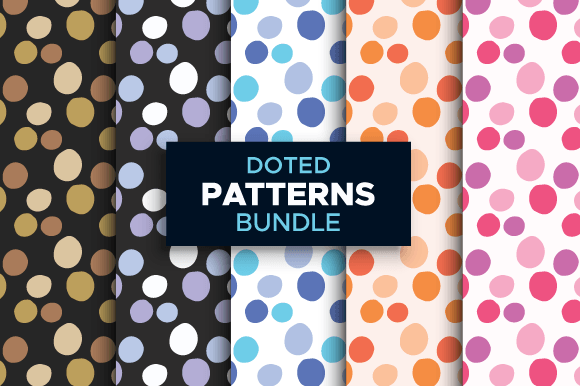
Dotted Seamless Patterns Bundle Colorful
Design consistency matters—especially when you’re building a brand, launching a product line, or preparing print-ready assets for clients. The Dotted Seamless Patterns Bundle Colorful is a purpose-built resource for creators who need reliable, high-fidelity pattern assets that scale without compromise. It’s not just a collection of dots; it’s a workflow accelerator for designers, marketers, educators, and small business owners who regularly produce physical or digital collateral—from packaging and stationery to social media templates and learning materials.
What This Bundle Is—and What It Solves
This bundle delivers five distinct dotted seamless patterns in vector and raster formats: AI, EPS, and PNG. Each pattern is fully editable, infinitely resizable, and designed to tile perfectly across any surface—no visible seams, no pixelation, no guesswork. Because they’re built as vectors (AI and EPS), you retain full control over color, spacing, and scale at every stage of production. The included PNG files (3000px × 3000px at 300ppi) provide immediate use in non-vector environments like Canva, Photoshop, or web-based editors where layer-level editing isn’t needed but print-quality resolution is essential.
Unlike low-resolution JPEGs or poorly constructed repeats, these patterns eliminate the common friction points in design workflows: reworking alignment, manually adjusting tiles, or compromising on output size due to raster limitations. That means less time troubleshooting and more time executing—whether you're designing a limited-edition notebook series, customizing teacher handouts, or prepping merch mockups for an Etsy launch.
How It Fits Into Real Creative Workflows
The Dotted Seamless Patterns Bundle Colorful integrates most effectively when treated as a foundational asset—not a last-minute add-on. Think of it like choosing your brand’s typography or core color palette early in a project. Once selected and applied consistently, it reinforces visual identity and reduces decision fatigue later on.
For example:
- Before a project starts: You might select one or two patterns from the bundle to define the tactile tone of an upcoming product line—say, pastel-dotted paper for eco-friendly gift tags or bold monochrome dots for tech-themed presentation decks. Having them ready ensures mood boards, client briefs, and style guides reflect cohesive direction from day one.
- During execution: A freelance graphic designer can drop a pattern into Illustrator, recolor it using Global Swatches, then apply it to multiple layers—backgrounds, borders, icons, or even texture overlays—without duplicating effort. Because all five patterns share consistent dimensions (5000px × 3000px in vector), swapping between them maintains layout integrity across documents.
- After finalization: When handing off files to a printer or manufacturer, the vector versions guarantee crisp reproduction at any scale—from tiny sticker sheets to large-format wall decals. No need to generate new assets per size; just resize and export.
Compatibility and Practical Integration
These patterns work across major design platforms with minimal setup. AI and EPS files open natively in Adobe Illustrator and Affinity Designer. They also import cleanly into CorelDRAW and InDesign for multi-page layouts or typography-forward compositions. For users outside the Adobe ecosystem, the high-res PNGs serve as plug-and-play textures in Figma, Canva Pro, or even PowerPoint—ideal for educators creating printable worksheets or marketers building quick social graphics.
A few practical notes for smooth integration:
- Color adjustment: In Illustrator, use the “Recolor Artwork” tool to shift dot hues globally—useful when matching brand guidelines or adapting patterns for seasonal campaigns.
- Scaling precision: Since the patterns are seamless and vector-based, resizing doesn’t affect tiling behavior. To maintain visual balance on large surfaces (e.g., fabric or wallpaper), test at 10–25% scale first—smaller dot density often reads cleaner at distance.
- File organization: Rename each file clearly (e.g., “Dotted-Pattern-Teal-Large.ai”) and store them in a dedicated “Patterns/Seamless” folder within your asset library. Consistent naming prevents version confusion during team handoffs or client revisions.
Quality Control and Long-Term Use
Vector scalability means quality doesn’t degrade—but consistency does depend on how you manage updates. If you modify a pattern (e.g., changing dot size or spacing), save the edited version separately rather than overwriting the original. That preserves flexibility: you may need the base version for another project, or want to revert if a client requests a different variation.
Also consider output context. While the PNGs are optimized for print (300ppi), they’re equally effective for high-res digital displays—think PDF reports, interactive e-learning modules, or retina-screen presentations. Just avoid stretching them beyond native dimensions in raster editors; unlike vectors, PNGs don’t regenerate detail when enlarged.
For long-term value, treat this bundle as part of a broader pattern system. Pair it with complementary resources—like geometric borders, minimalist icons, or coordinating fonts—to build repeatable design systems. Over time, that reduces reliance on stock sites and speeds up iteration cycles across projects.
Use Cases Across Roles
Small business owners use these patterns to unify packaging, labels, and thank-you cards—creating a recognizable shelf presence without hiring a designer for every SKU. A bakery, for instance, might apply a warm coral-dotted pattern to cupcake boxes, napkins, and receipt tape, reinforcing brand warmth across touchpoints.
Educators and course creators embed them into printable planners, flashcards, or worksheet headers. The subtle texture adds visual interest without distracting from content—especially helpful for neurodiverse learners who benefit from structured, predictable layouts.
Bloggers and content marketers apply them as background elements in Pinterest pins or email headers. Because the patterns are light and rhythmic—not loud or busy—they support readability while adding polish to otherwise text-heavy assets.
Freelancers and agencies keep them in their starter kits for client onboarding. Offering a curated set of patterns (including this bundle) as part of a brand identity package demonstrates attention to detail and saves clients from sourcing assets independently.
Making the Most of Your Purchase
Start by opening one AI file and exploring its structure: notice how the pattern is built inside an artboard sized to repeat cleanly. Duplicate the artboard, change fill colors, and experiment with opacity or blending modes—these small adjustments yield dozens of variations from a single file.
If you work with teams, share the bundle via cloud storage with clear usage guidelines: which files are for editing (AI/EPS), which are for direct placement (PNG), and how to credit or attribute if required (though these are royalty-free for commercial use). That avoids misapplication and keeps output aligned with your standards.
Finally, revisit the bundle quarterly. As your brand evolves or new projects emerge, you may find underused patterns suddenly fit a fresh direction—a muted grey dot for minimalist pitch decks, or a vibrant yellow variant for summer promotions. Keeping it accessible—not buried in downloads—ensures it stays useful, not forgotten.
Check the creator’s store for additional pattern collections and design resources. Following ensures timely access to updates, seasonal releases, or bundles that extend functionality—like coordinating halftones, watercolor overlays, or grid-based templates that pair naturally with dotted foundations.