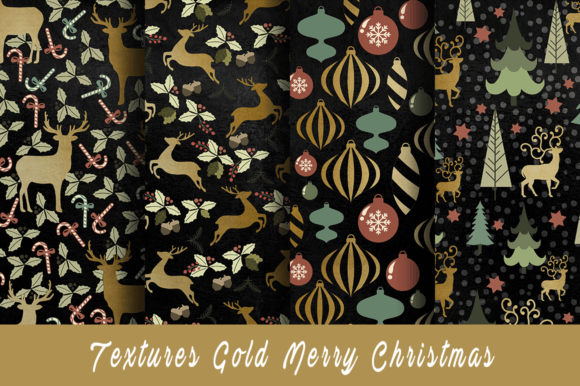
Christmas Chalk Gold Merry Patterns
Christmas Chalk Gold Merry Patterns is a curated digital paper collection designed for creators who value precision, versatility, and seasonal elegance. The Classic set includes 10 high-resolution JPEG files—each sized at 3600 x 3600 pixels and rendered at 300 dpi—making them suitable for both digital and print applications without quality loss. Unlike generic holiday graphics, these patterns combine hand-drawn chalk texture with refined gold foil accents, resulting in warmth, depth, and tactile sophistication. They’re not just decorative assets; they’re production-ready components that slot directly into existing creative workflows.
Where These Patterns Fit in Your Creative Process
Digital papers like Christmas Chalk Gold Merry Patterns rarely stand alone. They function best as foundational layers—part of a larger sequence that begins with concepting and ends with delivery or distribution. For example, when designing custom Christmas cards, you’ll likely start with messaging strategy (who’s receiving it? what tone fits your brand or family?), then move to layout planning (how much text? where does imagery anchor attention?), and only then apply surface-level design elements. That’s where these patterns come in: as the visual substrate that supports typography, illustrations, or photo overlays without competing for attention.
In product-based businesses—think Etsy shops selling printable party kits or small-batch textile designers—the patterns serve as consistent background elements across multiple SKUs. A single pattern might appear on a cupcake topper, a banner, and a gift tag—all while maintaining cohesive branding. This isn’t about repetition for its own sake; it’s about building recognition through controlled variation. Because all 10 patterns share the same chalk-and-gold aesthetic language, switching between them feels intentional rather than disjointed.
Practical Integration Across Platforms and Tools
These JPEG files are intentionally format-agnostic. You don’t need specialized software to use them. Whether you're working in Adobe Photoshop for layered composites, Canva for quick social media banners, Affinity Designer for vector-based layouts, or even Microsoft PowerPoint for classroom holiday activities, the 3600 x 3600 resolution ensures crisp rendering at standard print sizes (5x7", 8x10", A4) and digital displays alike.
For educators preparing December lesson plans, Christmas Chalk Gold Merry Patterns can become subtle backgrounds behind vocabulary flashcards or reading comprehension worksheets—adding festive context without distracting from learning objectives. Freelance marketers building email campaigns for retail clients may use one pattern as a border element in a newsletter header, another as a subtle tile behind a call-to-action button. The key is restraint: using the texture and gold sparingly maintains professionalism while still evoking seasonal warmth.
If you're integrating into a broader asset library—say, alongside fonts, icons, or photo collections—consider organizing them by usage intent. Group “background-only” patterns separately from those with built-in motifs (like faint holly sprigs or snowflakes), so you can quickly locate the right type depending on whether you need clean neutrality or gentle thematic reinforcement.
Preparation and Compatibility Considerations
Before importing Christmas Chalk Gold Merry Patterns into your project, confirm your software’s color profile settings. Since these are JPEGs—not editable vectors—they render best in sRGB for web use and CMYK-ready workflows for professional printing (though most modern RIPs handle RGB-to-CMYK conversion reliably). If you're sending files to a local print shop, ask whether they prefer embedded profiles or specific ICC settings; having this conversation early avoids last-minute color shifts.
Also consider file naming conventions. Renaming each JPEG with descriptive tags—e.g., chalkgold-merry-snowflakes-01.jpg instead of IMG_2948.jpg—saves time during bulk imports and improves long-term discoverability. Pair this with folder structure discipline: keep a dedicated “Holiday > Christmas > Digital Papers > Chalk Gold Merry” directory nested within your master resources library. Consistency here pays off every time you revisit a past project or onboard a new team member.
Workflow Examples That Reflect Real Use Cases
- Nursery Decor Planning: An interior designer sketches a gallery wall layout for a baby’s first Christmas. She places three framed prints on a mockup canvas, then uses one Christmas Chalk Gold Merry Pattern as a unified matting background behind all frames—creating visual rhythm without matching frames exactly.
- Small Business Product Launch: A candle maker preparing a limited-edition holiday line uses two patterns—one for the product label background, another for the downloadable gift guide PDF. Both share the same chalk grain and gold sheen, reinforcing brand continuity across physical and digital touchpoints.
- Digital Scrapbooking: A hobbyist compiling a family memory book scans handwritten notes and polaroids, then overlays them onto a Christmas Chalk Gold Merry Pattern page background. The texture adds dimension without obscuring the personal content, and the gold highlights catch light differently depending on screen brightness—giving the digital album subtle physicality.
Quality Control and Long-Term Usability
Because these are static JPEGs—not generative or AI-produced assets—their longevity is predictable. There’s no risk of style drift, licensing ambiguity, or API deprecation. Once downloaded, they remain usable indefinitely, across devices and software versions. That makes them ideal for archival projects or evergreen templates (e.g., an annual holiday newsletter design you update yearly with fresh copy but retain the same underlying pattern).
To maintain consistency over time, avoid over-editing the originals. Instead of adjusting brightness or contrast directly on the base file, create adjustment layers or duplicate copies with clear version labels (chalkgold-03-brightened.jpg). This preserves the integrity of your source assets and lets you revert confidently if a revised edit doesn’t perform as expected.
Efficiency Gains You’ll Notice Immediately
Time saved isn’t just about skipping a design step—it’s about reducing cognitive load. When you know your background textures are already calibrated for resolution, color, and seasonal appropriateness, you spend less time second-guessing visual hierarchy and more time refining message clarity or user experience. That shift matters whether you’re drafting a client proposal, prepping a classroom activity, or launching a Shopify collection.
Another underappreciated efficiency: scalability. Because each pattern is square and resolution-matched, resizing for different outputs—social posts, printables, embroidery digitizing guides—is largely drag-and-drop. No stretching, no pixelation, no re-rasterizing. Just reliable fidelity, delivered instantly after purchase.
Making the Most of Instant Download
The instant download nature of Christmas Chalk Gold Merry Patterns means integration starts the moment the files land in your Downloads folder. No waiting for physical shipment, no unpacking boxes, no scanning or photographing analog materials. That immediacy aligns with how modern creators actually work: in bursts, across devices, often under deadline pressure. Keep a bookmarked folder on your desktop or cloud sync location specifically for “Ready-to-Use Digital Papers,” and drop new purchases there as soon as they arrive. Within minutes, you can be testing a pattern against your current project’s palette or typography.
This isn’t just convenience—it’s workflow hygiene. The faster you move from acquisition to application, the more likely you are to preserve creative momentum and avoid decision fatigue around “which pattern should I use?” Having all 10 in one place, named clearly, eliminates that friction before it begins.